 Conao3 Notes
lsp-touchstone: a strict LSP client and server, with parts proved in Lean 4, that finds spec violations in editors and rust-analyzer
Editors and language servers talk to each other over the Language Server Protocol, or LSP for short. I use many editors and language servers, and each of them seemed to miss small details of the spec, but LSP has no official conformance test, and I found tools that check parts of a server but none that check a client.
So I built a client and a server that follow the spec strictly, and they judge whether the messages they exchange follow the spec. I wrote the three parts of the checks where a calculation is easy to get wrong in Lean 4, proved their properties, and turned them into Rust with lean-rs. When I connected it to five editors and rust-analyzer, lsp-mode, Neovim, VS Code, and rust-analyzer did things the spec forbids, and eglot and Helix did things that people read the spec differently on.
The tool is lsp-touchstone, the repository is conao3/rust-lsp-touchstone, and the license is Apache-2.0. The results in this post come from version 0.1.0.
What I built
lsp-touchstone runs in three modes.
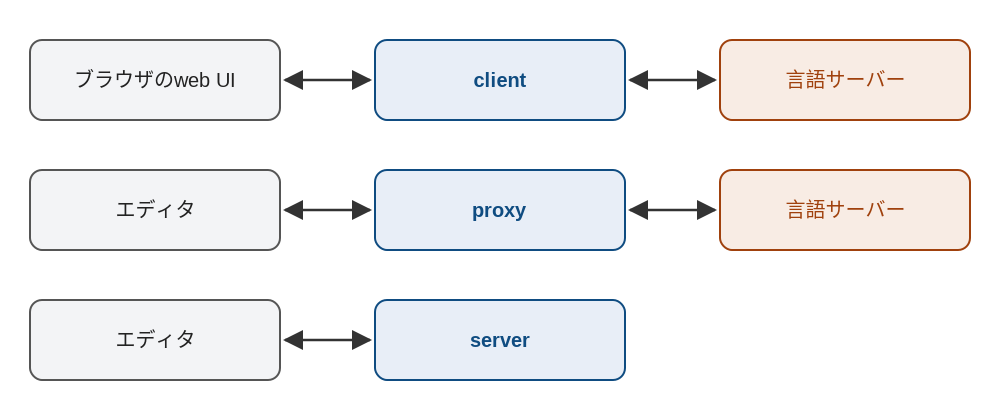
- client starts a language server from a web UI in the browser, and you send requests and notifications by hand.
- proxy sits between the editor and the language server, and checks every message as it relays it.
- server runs as the editor's language server, and sends the requests and notifications that the spec gives a server, one after another.
All three modes use the same checks. A capability is a feature that the client or the server declares at initialization as one it can handle. lsp-touchstone reads the types for the checks, and the capability that each method belongs to, from metaModel.json, the meta model of the LSP 3.18 spec. There are 80 kinds of findings, listed in docs/rules.md, and a finding is an error when the spec forbids the behavior, and a warning when the spec allows it but implementations read it differently.
The parts proved in Lean
If the checker is wrong, you can't trust its findings either, so I wrote the three parts where a calculation is easy to get wrong in Lean and proved their properties.
- LSP gives a position as a line and a character offset, and the two sides agree at initialization on whether to count characters in UTF-8, UTF-16, or UTF-32 units.
😀counts as 1 in UTF-32, 2 in UTF-16, and 4 in UTF-8. For the conversions between units, I proved that a round trip gives back the original position, and that the conversion can tell when a position points into the middle of a character. - The calculation that applies a change from
didChangeto the local copy of the document by replacing a range. I proved that the text before and after the range stays, that the new string goes in at that position, and that the length comes out as expected. - The transitions of the progress state. The server sends progress as
begin, some number ofreport, andend, in that order.
Here is the progress part, without the definitions of the types TokenState and ProgressKind and the other theorems.
When you build, Lean checks the proofs of the code in lean!, and lean-rs turns the code into Rust functions.
lean_rust::lean! {
    pub mod proved;
    r#"
    def step : TokenState → ProgressKind → Option TokenState
      | .created, .begin => some .begun
      | .begun, .report => some .begun
      | .begun, .finish => some .ended
      | _, _ => none

    theorem ended_accepts_nothing (k : ProgressKind) : step .ended k = none := by
      cases k <;> rfl
    "#
}
ended_accepts_nothing states that the state after end accepts no kind of progress.
The proxy calls this step on every progress notification, and reports a violation when it returns none.
Spec violations I found
make check-editors drives eglot, lsp-mode, Neovim, Helix, and VS Code with no human input.
It connects each editor to the lsp-touchstone server, and separately to rust-analyzer through the proxy, then runs hover, completion, go to definition, typing one line, an edit from a code action, save, and exit, in that order.
The editors and rust-analyzer come from nixpkgs, at these versions.
- Emacs 31.1, eglot 1.24.31, lsp-mode 20261020.1728
- Neovim 0.12.6
- Helix 25.07.1
vscode-languageclient11.0.0, the client library of VS Code. I ran it in VSCodium 1.143.17183, which builds VS Code from source and distributes it.- rust-analyzer 2026-11-02
Shutdown
In LSP, the client sends shutdown, waits for the response, and then sends exit.
The spec says that once the client has sent shutdown, it must not send any request or notification other than exit.
Clients must not send any requests or notifications other than
exitto a server to which they have sent a shutdown request. Clients should also wait with sending theexitnotification until they have received a response from theshutdownrequest.
The six implementations each step out of this sequence in a different way, and the findings for eglot and Helix are warnings, while those for the other four are errors. "In some runs" marks behavior that showed up in only some of several runs.
- eglot sends
exitwith"params": {}. The exit notification in the spec has no params, so lsp-touchstone reports a warning. - lsp-mode ends the server process without sending
exit, and in some runs sendsexitwith"params": null. JSON-RPC 2.0 says "If present, parameters for the rpc call MUST be provided as a Structured value. Either by-position through an Array or by-name through an Object.", andnulldoesn't meet that rule. - Neovim, connected to rust-analyzer, sends a
textDocument/semanticTokensrequest aftershutdownin some runs. - The VS Code client sends
$/cancelRequestaftershutdownin some runs. - Helix ends the server process before
exitarrives in some runs. - rust-analyzer answers
shutdownand exits while requests from the client are still unanswered.
Undeclared capabilities
In LSP, the client and the server declare the features they can handle as capabilities in initialize, so if you send a request for a feature the other side hasn't declared, the other side may not handle it.
If you start rust-analyzer from the client web UI, initialize it, and open one file, you get this finding.
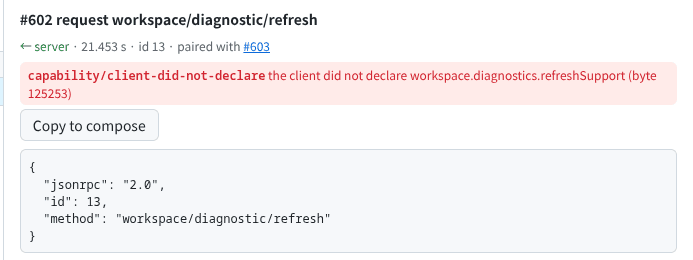
rust-analyzer sends a workspace/diagnostic/refresh request, but the spec ties this request to the client capability workspace.diagnostics.refreshSupport, and the lsp-touchstone client doesn't declare it.
rust-analyzer sent this request with each of the five editors, and none of the five declare refreshSupport, yet eglot, lsp-mode, Neovim, and VS Code answered with success, "result": null.
Helix answered with a "method not found" error, and rust-analyzer kept running.
Other behavior
- rust-analyzer can start sending progress on a token before it receives the response to window/workDoneProgress/create. The spec forbids progress on that token when the response is an error, so a server that sends without waiting breaks the spec whenever an error comes back.
- When Emacs renames the file to the backup
main.rs~on the first save, lsp-mode sendsworkspace/willRenameFilesto the server. - The server picks the unit for counting positions from the ones the client offers, preferring
utf-32, thenutf-8, thenutf-16. With eglot, lsp-mode, Neovim, and Helix it picksutf-32, and the VS Code client offers onlyutf-16.
What worked
The server sends an edit to the editor with workspace/applyEdit from a code action, rebuilds the document from the didChange notifications that the editor sends back, and checks that the result matches the document with the edit applied.
All five editors applied this edit right.
When a feature shows its result on screen, like applying an edit, users notice at once if it goes wrong, but every violation I found happened while the editor was closing, or in exchanges that show nothing on screen. Real editors and language servers keep going when they receive a message that breaks the spec, so the side that broke it gets no signal back, and I think finding those violations takes a peer that reports each one.
How to use it
You give the editor the command that starts the proxy as its language server command, so with eglot you write this.
(add-to-list 'eglot-server-programs
             '(rust-ts-mode . ("lsp-touchstone" "proxy" "run-proxy"
                               "--web-ui-port" "4318"
                               "--server-command-args" "rust-analyzer")))
After --server-command-args, write the command of the real language server, and with --web-ui-port, lsp-touchstone prints to standard error the URL of a web UI that shows the traffic as it happens.
docs/editors.md has the settings for lsp-mode, Neovim, Helix, and VS Code, and the detailed results for each editor.