 Conao3 Notes
Deploying GitHub Actions builds to Cloudflare Workers without an API token in GitHub
I build the site at https://emacs-doc.conao3.com with GitHub Actions and deploy it to Cloudflare Workers without creating a Cloudflare API token or storing one in GitHub. The site hosts a machine translation of the GNU Emacs manual into Japanese, and the conao3/emacs-doc repository is public.
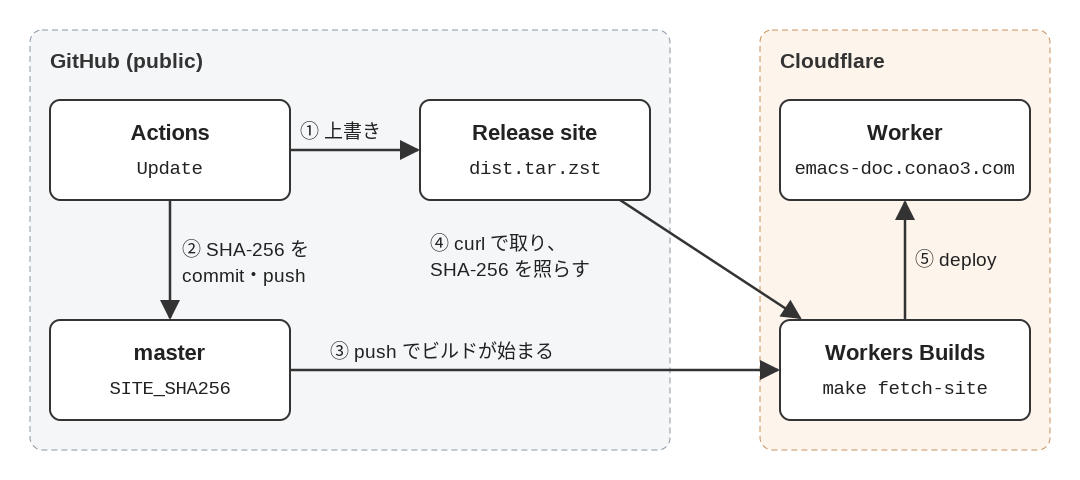
GitHub Actions attaches the build to a GitHub release. Cloudflare Workers Builds downloads that attachment and deploys it.
The standard GitHub Actions setup
To follow Cloudflare's GitHub Actions guide, store CLOUDFLARE_API_TOKEN and CLOUDFLARE_ACCOUNT_ID as repository secrets and pass them to cloudflare/wrangler-action.
The Netatalk/netatalk.io project uses po4a to translate its documentation and stores a token in repository secrets to deploy the site to Cloudflare Pages.
Some cloud providers accept GitHub OIDC in place of a stored token. Cloudflare doesn't accept GitHub OIDC for Workers deployments.
What the emacs-doc build needs
With Cloudflare's Git integration, Workers Builds runs your build and deployment commands on Cloudflare whenever you push to a branch it watches.
The default deploy command is npx wrangler deploy, and Workers Builds handles the Cloudflare credentials.
Building emacs-doc takes makeinfo --html to convert the Texinfo manual to HTML and po4a to insert the translations.
The Ubuntu 24.04 Workers Builds image ships with Node and Python, and the emacs-doc build needs texinfo, po4a, and gettext, which the image lacks.
Cloudflare's build limit is 20 minutes per run, and make pot and make site each take about 5 minutes for emacs-doc.
Build on GitHub Actions and deploy with Workers Builds
GitHub Actions builds the site and uploads dist.tar.zst to the site release.
Workers Builds checks the archive against the SHA-256 in SITE_SHA256 before deploying.
1. Build the site and upload it to the release
I run the Update workflow by hand with workflow_dispatch.
The workflow builds the site in dist/ and packages it with make package.
package:
        mkdir -p build
        tar --sort=name --mtime=@0 --owner=0 --group=0 --numeric-owner --pax-option=delete=atime,delete=ctime \
          -C $(DIST_DIR) -cf build/dist.tar .
        zstd -q -19 -f --rm -o $(SITE_ARCHIVE) build/dist.tar
        sha256sum $(SITE_ARCHIVE) | cut -d" " -f1 > SITE_SHA256
I use these tar options to get the same bytes from the same files. I sort the files by name, set their modification time, owner, and group to 0, and omit access time (atime) and status change time (ctime) from the pax headers. The archive I made on my machine and the one GitHub Actions made had the same SHA-256.
The workflow replaces the asset on the site release with the new archive.
- name: Upload the site to the release
  env:
    GH_TOKEN: ${{ github.token }}
  run: |
    gh release view site >/dev/null 2>&1 || gh release create site --title site \
      --notes "The site deployed by Workers Builds (make fetch-site)." --latest=false
    gh release upload site build/dist.tar.zst --clobber
With contents: write, the workflow can upload the asset using the GITHUB_TOKEN that GitHub Actions issues.
2. Commit the SHA-256 to master
The workflow stages EMACS_REVISION, SITE_SHA256, and the PO files for a commit to master. If all three match master, it makes no commit.
This excerpt leaves out how the workflow handles PO files.
- name: Commit the catalogs and the checksum of the site
  run: |
    git config user.name "github-actions[bot]"
    git config user.email "41898282+github-actions[bot]@users.noreply.github.com"
    git add EMACS_REVISION SITE_SHA256 po/*.ja.po
    if ! git diff --cached --quiet; then
      git commit -m "Update the site for Emacs $(cut -c1-10 EMACS_REVISION)"
      git push
    fi
3. Download and deploy the archive with Workers Builds
I connect the emacs-doc Worker to the GitHub repository's master branch in Workers Builds.
I set the build command to make fetch-site and the deploy command to npx wrangler deploy.
SITE_URL := https://github.com/conao3/emacs-doc/releases/download/site/dist.tar.zst

fetch-site:
        mkdir -p build
        curl -fsSL --retry 3 -o $(SITE_ARCHIVE) $(SITE_URL)
        echo "$$(cat SITE_SHA256)  $(SITE_ARCHIVE)" | sha256sum --check
        rm -rf $(DIST_DIR)
        mkdir $(DIST_DIR)
        tar --zstd -xf $(SITE_ARCHIVE) -C $(DIST_DIR)
Anyone can fetch the release asset with curl because the repository is public.
The build command uses sha256sum --check to compare the downloaded archive with SITE_SHA256, then extracts it to dist/.
The Workers Builds image includes curl, sha256sum, tar, and zstd, so it can run this build command.
In wrangler.jsonc, assets.directory points to ./dist, so npx wrangler deploy uploads that directory as the Worker's static assets.
After deployment, GitHub shows a Workers Builds: emacs-doc check run on the commit.
What this setup means for deployments
- I leave the GitHub repository's secrets empty. Cloudflare creates and stores the token that Workers Builds uses, and GitHub Actions uses its own
GITHUB_TOKEN. - The site has 2,240 files. The tar archive takes up 49 MB, and zstd compresses it to 4.7 MB. Git tracks the 64-character SHA-256.
- Identical site contents produce identical archive bytes and the same
SITE_SHA256. IfEMACS_REVISIONand the PO files also stay the same, the workflow makes no commit and Workers Builds doesn't run. - Pushes that leave
SITE_SHA256untouched, such as a README edit, still trigger Workers Builds. It fetches the same archive and redeploys the same site. - If the release archive and
SITE_SHA256disagree,sha256sum --checkfails and stops the build before deployment. The live site keeps serving the last archive that passed the check.
The release holds a single archive, so you can't redeploy an earlier version of the site from an older commit.
Workers Builds fails the check if that commit's SITE_SHA256 differs from the current archive, and deploys the current archive if they match.
A push between the archive upload and the push that updates SITE_SHA256 can also trigger a build with a mismatched checksum.
To roll back, rebuild the site from the version you want and upload that build.
Similar setups on GitHub Pages
Many GitHub Pages workflows publish builds without a stored token.
They upload the build with actions/upload-pages-artifact and publish it with actions/deploy-pages, which uses OIDC with id-token: write.
The r0man/beads.el project builds a manual with makeinfo and publishes it this way.
The fierceX/freebsd-doc-cn project uses po4a to translate the FreeBSD documentation and uses GITHUB_TOKEN to push the build to the bsd-doc branch.
My searches of GitHub code and the web turned up no other projects where Workers Builds deploys a GitHub release asset.
Deploying static assets with Workers Builds
If your site needs tools outside the Workers Builds image, build it with GitHub Actions and attach the build to a public GitHub release.
Workers Builds can deploy the site as static assets without a Cloudflare token in GitHub.
Workers Builds compares the release archive with SITE_SHA256 on master and deploys the archive that matches.