 Conao3 Notes
vow: JavaScript-style async/await for Emacs Lisp
I wrote vow, a library for Emacs Lisp modeled on JavaScript's Promise and async/await. With async/await, you write code that waits for processes and timers from top to bottom, with no nested callbacks.
You can keep using Emacs while vow-await waits.
When the awaited work fails, you handle the error with condition-case, the same way you do in synchronous code.
You can step through async/await functions in Edebug, the same way you step through ordinary functions.
The repository is conao3/vow.el, under GPL-3.0. It runs on Emacs 31.1 and later, and this post uses afb6269 on master with Emacs 31.1.
What vow does
- Create a promise that follows Promises/A+ as a vow, and chain vows with
vow-then. - Call
vow-awaitinside a function defined withvow-defunto wait for a vow to settle. - Wait for several vows at once with
vow-allorvow-race. - Run an external command with
vow-processand get its output as a vow. - Hand a function to another Emacs with
vow-async-start, so Emacs keeps running during heavy computation. - Bind buffers and processes with
vow-using, and clean them up when the body ends. - Step through async/await functions in Edebug.
Writing async/await in Emacs Lisp
Install vow from GitHub with leaf's :vc.
(leaf vow
  :vc (:url "https://github.com/conao3/vow.el"))
Here is an example that waits for the output of external commands.
vow-process runs a command asynchronously and fulfills the vow with its standard output when the exit code is 0.
For any other exit code, it rejects the vow with a vow-process-failed error.
;;; vow-example.el --- vow example  -*- lexical-binding: t; -*-
(require 'vow)

(vow-defun my-versions ()
  (let ((git (vow-await (vow-process "git" "--version")))
        (emacs (vow-await (vow-process "emacs" "--version"))))
    (format "%s / %s" (string-trim git) (car (split-string emacs "\n")))))

(vow-defun my-status ()
  (condition-case err
      (vow-await (vow-process "git" "no-such-command"))
    (vow-process-failed (format "failed: exit %d" (nth 3 err)))))

(message "%s" (vow-wait (my-versions)))
(message "%s" (vow-wait (my-status)))
my-versions waits for the versions of git and emacs in turn, and joins them into one string.
my-status waits for a command that fails, so the error of the rejected vow appears at vow-await.
It handles that error with condition-case and takes out the exit code.
A function defined with vow-defun returns a vow as soon as you call it, so in batch mode you wait for the vow with vow-wait and get its value.
$ emacs --batch -Q -L vow.el -l vow-example.el
git version 2.56.0 / GNU Emacs 31.1
failed: exit 1
To run two commands at the same time, wait for them with vow-all.
(vow-defun my-versions-at-once ()
  (pcase-let ((`(,git ,emacs)
               (vow-await (vow-all (list (vow-process "git" "--version")
                                         (vow-process "emacs" "--version"))))))
    (format "%s / %s" (string-trim git) (car (split-string emacs "\n")))))
You can wrap a function that takes a callback in vow-new, so that it returns a vow.
The my-fetch below fulfills the vow with the body of the page that url-retrieve fetched.
(defun my-fetch (url)
  "Return a vow for the body of URL."
  (vow-new
   (lambda (resolve reject)
     (url-retrieve url
                   (lambda (status)
                     (let ((error (plist-get status :error)))
                       (if error
                           (funcall reject error)
                         (goto-char url-http-end-of-headers)
                         (funcall resolve (buffer-substring (point) (point-max))))
                       (kill-buffer)))))))
How vow-await stops and resumes
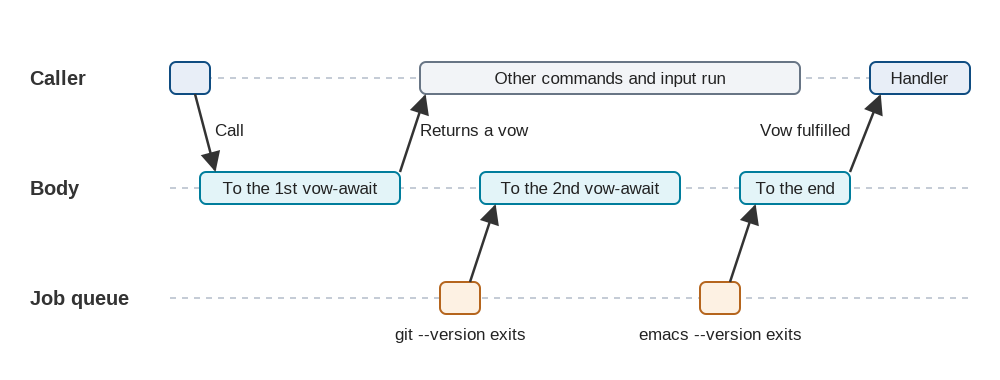
vow-defun turns the body into iter-lambda, a generator function, and turns vow-await into iter-yield.
generator.el rewrites the body in continuation-passing style, so the body stops at iter-yield and can resume from there later.
When you call my-versions, the body runs to the first vow-await and stops, and the caller gets a vow for the result of the body.
When the git --version process exits, vow fulfills the awaited vow and puts a job that continues the body into the job queue.
A run-at-time timer runs the job queue, which advances the body to the next vow-await.
To resume, vow passes the body a function that returns the value of the awaited vow, and the body uses what that function returns as the value of vow-await.
When the vow was rejected, the error appears at the same place, so condition-case and unwind-protect work as usual.
generator.el does not rewrite the inside of nested lambdas, so you cannot use vow-await inside a function passed to mapcar.
A vow-await in such a place signals an error at macro expansion, so use dolist or cl-loop to wait inside a loop.
Buffers and cleanup while waiting
The body resumes in the buffer that was current when it stopped.
with-current-buffer and save-excursion work across vow-await, and when that buffer is killed during the wait, vow-await signals a vow-buffer-killed error.
vow-using is JavaScript's await using: when the body ends, it cleans up the bound buffers and processes in reverse order.
When the body ends with an error, it cleans up the same way, and when the cleanup signals another error, it keeps both errors in vow-suppressed.
my-open and my-close are functions that open and close a connection.
(vow-defun my-download (url)
  (vow-using ((buffer (generate-new-buffer " *download*"))
              (conn (my-open url) #'my-close))
    (vow-await (my-read conn buffer))
    (with-current-buffer buffer (buffer-string))))
Running heavy computation in another Emacs
When you wait for a process or a timer, Emacs accepts input during vow-await.
Heavy computation written in Emacs Lisp runs in the same Emacs even inside a vow, so Emacs accepts no input and runs no timers until the computation ends.
vow-async-start starts a child Emacs with async-start from the async package.
The child runs the function, and its value fulfills the vow.
vow loads the async package from GNU ELPA only when you call vow-async-start, so the other functions work without it.
To see the difference, I ran two computations, A and B, that count the primes below 300000, in two ways.
The first way wraps A and B in vow-try and waits for them in the current Emacs.
The second way hands B to a child Emacs and then counts A in the current Emacs.
I used version 2.0 of the async package.
my-time calls a function and prints how many seconds it took.
;;; vow-child-example.el --- vow example  -*- lexical-binding: t; -*-
(require 'vow)

(defun my-count-primes (n)
  "Return the number of primes below N."
  (let ((count 0))
    (dotimes (i n)
      (let ((d 2) (prime (> i 1)))
        (while (and prime (<= (* d d) i))
          (when (zerop (% i d)) (setq prime nil))
          (setq d (1+ d)))
        (when prime (setq count (1+ count)))))
    count))

(defun my-count-primes-in-child (n)
  "Return a vow for the number of primes below N, counted in a child Emacs."
  (let ((count-primes (symbol-function 'my-count-primes)))
    (vow-async-start (lambda () (funcall count-primes n)))))

(defun my-time (label function)
  "Call FUNCTION and show how many seconds it took."
  (let ((start (float-time)))
    (funcall function)
    (message "%s: %.0f seconds" label (- (float-time) start))))

(my-time "A and B in this Emacs"
         (lambda ()
           (vow-wait (vow-all (list (vow-try #'my-count-primes 300000)
                                    (vow-try #'my-count-primes 300000))))))
(my-time "A in this Emacs, B in a child Emacs"
         (lambda ()
           (let ((b (my-count-primes-in-child 300000)))
             (my-count-primes 300000)
             (vow-wait b))))
The child Emacs does not have the functions defined in the parent, so my-count-primes-in-child takes the function definition with symbol-function and passes it inside a closure.
$ emacs --batch -Q -L vow.el -L async -l vow-child-example.el
A and B in this Emacs: 5 seconds
A in this Emacs, B in a child Emacs: 3 seconds
Even inside vows, the two computations run one after the other in the current Emacs, so they take 5 seconds. With B in a child Emacs, B runs at the same time as A, and both finish in 3 seconds.
A vow only arranges how you wait, so to make computation faster, split it into another process with vow-async-start.
The function and its value travel between the two Emacs as text, so you can pass only values that Emacs can print and read back. A closure passes copies of the values of its captured variables to the child, so changes the child makes to those variables do not reach the parent.
To run an external command, use vow-process, which starts no child Emacs and gives you the standard error output when the command fails.
Stepping through with Edebug
Put the cursor on a vow-defun definition and press C-u C-M-x to instrument it with Edebug, the same way you instrument an ordinary function.
When stepping reaches vow-await, Edebug exits, and when the awaited vow settles, stepping continues from where it stopped.
Edebug keeps its execution mode after a resume, so when you run with g or c, it goes across vow-await to the next breakpoint.
Edebug stops at the expression that signals an error that no condition-case handles.
generator.el renames the local variables of the body, so Edebug's e reads only the local variables from before the first vow-await.
After a resume, check variable values in the expression values that Edebug shows while you step.
Correspondence with JavaScript
vow follows the Promise and async function features of ECMAScript up to ECMAScript 2027, and the Await Dictionary proposal at stage 3. The main correspondences are below.
| ECMAScript | Edition | vow |
|---|---|---|
new Promise(executor) |
2015 | vow-new |
async function, await |
2017 | vow-defun, vow-await |
Promise.allSettled |
2020 | vow-all-settled |
Promise.any |
2021 | vow-any |
Promise.withResolvers |
2024 | vow-with-resolvers |
Promise.try |
2025 | vow-try |
Array.fromAsync |
2026 | vow-from-async |
await using |
2027 | vow-using |
Promise.allKeyed |
stage 3 | vow-all-keyed |
The full list is in "ECMAScript correspondence" in the README.
Conclusion
With vow-await, you read the waiting code from top to bottom in the body, and you handle its errors with condition-case.
Give vow a try the next time you wait for a process or a timer.