 Conao3 Notes
7d9eba.md
「Emacs LispでJavaScriptと同じasync/awaitを書けるvowを作った」の 7d9eba.md です。「そのまま開く」はファイルをそのまま返します。
# Emacs LispでJavaScriptと同じasync/awaitを書けるvowを作った
Date: 2026-11-27
Updated: 2026-11-27
Tags: emacs, emacs-lisp, async, macro, release, vow-el
URL: https://s.conao3.com/blog/2026/7d9eba
Author: conao3 (Naoya Yamashita)
Emacs Lisp向けに、JavaScriptのPromiseとasync/awaitにならったvowというライブラリを作りました。
プロセスやタイマーを待つ処理を、コールバックを入れ子にせずasync/awaitで上から順に書けます。
`vow-await` で待っている間もEmacsは操作できます。
待っていた処理が失敗したときは、同期のコードと同じように `condition-case` でエラーを処理できます。
async/awaitで書いた関数は普段の関数と同じようにEdebugでステップ実行できます。
リポジトリは [conao3/vow.el](https://github.com/conao3/vow.el) で、ライセンスは [GPL-3.0](https://github.com/conao3/vow.el/blob/afb6269/LICENSE) です。
Emacs 31.1以降で動き、この記事ではmasterの [afb6269](https://github.com/conao3/vow.el/commit/afb6269) とEmacs 31.1を使いました。
[conao3/vow.el](https://github.com/conao3/vow.el): Promises/A+ and async/await for Emacs Lisp
# vowでできること
- [Promises/A+](https://promisesaplus.com) に従うPromiseをvowとして作り、 `vow-then` でつなぐ。
- `vow-defun` で定義した関数の中で `vow-await` を使い、vowが決まるのを待つ。
- `vow-all` や `vow-race` で複数のvowをまとめて待つ。
- `vow-process` で外部のコマンドを動かし、その出力をvowで受け取る。
- `vow-async-start` で関数を別のEmacsに動かさせ、重い計算の間もEmacsを止めない。
- `vow-using` でバッファやプロセスを束縛し、本体が終わったら後始末をする。
- async/awaitで書いた関数をEdebugでステップ実行する。
# Emacs Lispでasync/awaitを書く
leafの `:vc` を使うと、GitHubにあるvowを入れられます。
```emacs-lisp
(leaf vow
:vc (:url "https://github.com/conao3/vow.el"))
```
外部のコマンドの出力を待つ例を書いてみます。
`vow-process` はコマンドを非同期に動かし、終了コードが0なら標準出力でvowを満たします。
それ以外のときは `vow-process-failed` のエラーでvowを棄却します。
```emacs-lisp
;;; vow-example.el --- vow example -*- lexical-binding: t; -*-
(require 'vow)
(vow-defun my-versions ()
(let ((git (vow-await (vow-process "git" "--version")))
(emacs (vow-await (vow-process "emacs" "--version"))))
(format "%s / %s" (string-trim git) (car (split-string emacs "\n")))))
(vow-defun my-status ()
(condition-case err
(vow-await (vow-process "git" "no-such-command"))
(vow-process-failed (format "failed: exit %d" (nth 3 err)))))
(message "%s" (vow-wait (my-versions)))
(message "%s" (vow-wait (my-status)))
```
`my-versions` はgitとemacsのバージョンを順に待って、1つの文字列にします。
`my-status` は失敗するコマンドを待つので、棄却されたvowのエラーが `vow-await` の位置で起きます。
そのエラーを `condition-case` で処理して、終了コードを取り出しています。
`vow-defun` で定義した関数は呼ぶとすぐにvowを返すので、バッチで動かすときは `vow-wait` でvowが決まるまで待って値を受け取ります。
```sh
$ emacs --batch -Q -L vow.el -l vow-example.el
git version 2.56.0 / GNU Emacs 31.1
failed: exit 1
```
2つのコマンドを同時に動かすときは `vow-all` で待ちます。
```emacs-lisp
(vow-defun my-versions-at-once ()
(pcase-let ((`(,git ,emacs)
(vow-await (vow-all (list (vow-process "git" "--version")
(vow-process "emacs" "--version"))))))
(format "%s / %s" (string-trim git) (car (split-string emacs "\n")))))
```
コールバックを受け取る関数も `vow-new` で包むとvowを返せます。
次の `my-fetch` は `url-retrieve` で取ったページの本文でvowを満たします。
```emacs-lisp
(defun my-fetch (url)
"Return a vow for the body of URL."
(vow-new
(lambda (resolve reject)
(url-retrieve url
(lambda (status)
(let ((error (plist-get status :error)))
(if error
(funcall reject error)
(goto-char url-http-end-of-headers)
(funcall resolve (buffer-substring (point) (point-max))))
(kill-buffer)))))))
```
# vow-awaitで止まって再開する仕組み
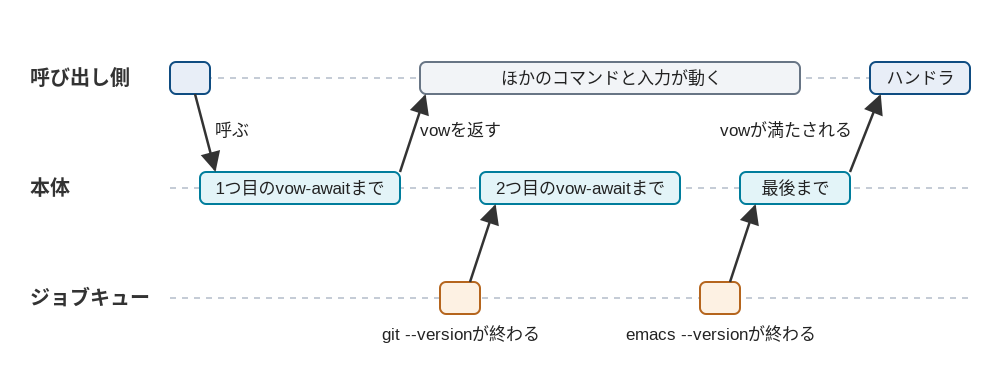
`vow-defun` は本体をgeneratorの関数 `iter-lambda` に変え、 `vow-await` を `iter-yield` に変えます。
generator.elは本体を継続渡しの形に書き換えるので、本体は `iter-yield` の位置で止まり、あとからその位置から続けられます。
`my-versions` を呼ぶと、本体は1つ目の `vow-await` まで動いて止まり、呼び出し側には本体の結果を表すvowが返ります。
待っていたvowは `git --version` のプロセスが終わると満たされ、続きを動かすジョブがジョブキューに入ります。
ジョブキューは `run-at-time` のタイマーから動いて、本体を次の `vow-await` まで進めます。
続きを動かすときは待っていたvowの値を返す関数を本体に渡し、本体はその関数を呼んだ値を `vow-await` の値にします。
vowが棄却されていれば同じ位置でエラーが起きるので、 `condition-case` と `unwind-protect` が普段どおりに働きます。
generator.elは入れ子のlambdaの中までは書き換えないので、 `mapcar` に渡す関数の中では `vow-await` を使えません。
この位置の `vow-await` はマクロを展開するときにエラーになるので、ループの中で待つときは `dolist` や `cl-loop` を使います。
# 待つ間のバッファと後始末
本体は止まったときのカレントバッファで再開します。
`with-current-buffer` と `save-excursion` も `vow-await` をまたいで使えて、待っている間にそのバッファが削除されると `vow-await` が `vow-buffer-killed` のエラーを起こします。
`vow-using` はJavaScriptの `await using` に当たり、束縛したバッファやプロセスを本体が終わったときに逆順で後始末します。
本体がエラーで終わったときも後始末をして、後始末でもエラーが起きたら2つのエラーを `vow-suppressed` にまとめます。
`my-open` と `my-close` は接続を開閉する関数です。
```emacs-lisp
(vow-defun my-download (url)
(vow-using ((buffer (generate-new-buffer " *download*"))
(conn (my-open url) #'my-close))
(vow-await (my-read conn buffer))
(with-current-buffer buffer (buffer-string))))
```
# 重い計算を別のEmacsで動かす
待つ相手がプロセスやタイマーなら、 `vow-await` で待つ間もEmacsは入力を受け付けます。
Emacs Lispで書いた重い計算はvowで包んでも同じEmacsで動くので、計算が終わるまでEmacsは入力もタイマーも受け付けません。
`vow-async-start` は [async](https://github.com/jwiegley/emacs-async) パッケージの `async-start` で子のEmacsを起動します。
そこで関数を動かして、その値でvowを満たします。
vowは `vow-async-start` を呼んだときだけGNU ELPAのasyncパッケージを読み込むので、ほかの関数には要りません。
違いを見るために、300000より小さい素数を数える計算AとBを2通りで動かしてみました。
1つ目はAとBを `vow-try` で包んで今のEmacsで待ちます。
2つ目はBを子のEmacsに任せてからAを今のEmacsで数えます。
asyncパッケージは2.0を使いました。
`my-time` は関数を呼んでかかった秒数を表示します。
```emacs-lisp
;;; vow-child-example.el --- vow example -*- lexical-binding: t; -*-
(require 'vow)
(defun my-count-primes (n)
"Return the number of primes below N."
(let ((count 0))
(dotimes (i n)
(let ((d 2) (prime (> i 1)))
(while (and prime (<= (* d d) i))
(when (zerop (% i d)) (setq prime nil))
(setq d (1+ d)))
(when prime (setq count (1+ count)))))
count))
(defun my-count-primes-in-child (n)
"Return a vow for the number of primes below N, counted in a child Emacs."
(let ((count-primes (symbol-function 'my-count-primes)))
(vow-async-start (lambda () (funcall count-primes n)))))
(defun my-time (label function)
"Call FUNCTION and show how many seconds it took."
(let ((start (float-time)))
(funcall function)
(message "%s: %.0f seconds" label (- (float-time) start))))
(my-time "A and B in this Emacs"
(lambda ()
(vow-wait (vow-all (list (vow-try #'my-count-primes 300000)
(vow-try #'my-count-primes 300000))))))
(my-time "A in this Emacs, B in a child Emacs"
(lambda ()
(let ((b (my-count-primes-in-child 300000)))
(my-count-primes 300000)
(vow-wait b))))
```
子のEmacsには親で定義した関数が無いので、 `my-count-primes-in-child` は関数の定義を `symbol-function` で取り出し、クロージャーに閉じ込めて渡しています。
```sh
$ emacs --batch -Q -L vow.el -L async -l vow-child-example.el
A and B in this Emacs: 5 seconds
A in this Emacs, B in a child Emacs: 3 seconds
```
vowで包んでも2つの計算は今のEmacsで順に動くので5秒かかります。
Bを子のEmacsに任せるとAと同時に進むので3秒で終わります。
vowは待ち方を整えるだけなので、計算を速くするには `vow-async-start` で別のプロセスに分けます。
関数とその値は2つのEmacsの間を文字列で行き来するので、印字して読み戻せる値だけを渡せます。
クロージャーが閉じ込めた変数は値の写しとして子に渡るので、子で変数を書き換えても親には届きません。
外部のコマンドを動かすだけなら、子のEmacsを起動しない `vow-process` を使えば、失敗したときの標準エラー出力も受け取れます。
# Edebugでステップ実行する
`vow-defun` の定義にカーソルを置いて `C-u C-M-x` を押すと、普段の関数と同じようにEdebugで計装できて、ステップ実行が `vow-await` に来るとEdebugから一度抜け、待っていたvowが決まると止まった位置からステップ実行が続きます。
Edebugの実行モードは再開した後も引き継がれるので、 `g` や `c` で動かせば `vow-await` をまたいで次のブレークポイントまで進みます。
Edebugは `condition-case` で処理していないエラーを起こした式で止まります。
generator.elが本体のローカル変数の名前を書き換えるので、Edebugの `e` で読めるローカル変数は最初の `vow-await` より前のものだけです。
再開した後の変数の値は、ステップ実行中にEdebugが表示する式の値で確かめます。
# JavaScriptとの対応
vowはECMAScript 2027までのPromiseとasync関数の機能と、stage 3のAwait Dictionaryの提案を写しています。
おもな対応は次のとおりです。
<table border="2" cellspacing="0" cellpadding="6" rules="groups" frame="hsides">
<colgroup>
<col class="org-left" />
<col class="org-right" />
<col class="org-left" />
</colgroup>
<thead>
<tr>
<th scope="col" class="org-left">ECMAScript</th>
<th scope="col" class="org-right">Edition</th>
<th scope="col" class="org-left">vow</th>
</tr>
</thead>
<tbody>
<tr>
<td class="org-left"><code>new Promise(executor)</code></td>
<td class="org-right">2015</td>
<td class="org-left"><code>vow-new</code></td>
</tr>
<tr>
<td class="org-left"><code>async function</code>, <code>await</code></td>
<td class="org-right">2017</td>
<td class="org-left"><code>vow-defun</code>, <code>vow-await</code></td>
</tr>
<tr>
<td class="org-left"><code>Promise.allSettled</code></td>
<td class="org-right">2020</td>
<td class="org-left"><code>vow-all-settled</code></td>
</tr>
<tr>
<td class="org-left"><code>Promise.any</code></td>
<td class="org-right">2021</td>
<td class="org-left"><code>vow-any</code></td>
</tr>
<tr>
<td class="org-left"><code>Promise.withResolvers</code></td>
<td class="org-right">2024</td>
<td class="org-left"><code>vow-with-resolvers</code></td>
</tr>
<tr>
<td class="org-left"><code>Promise.try</code></td>
<td class="org-right">2025</td>
<td class="org-left"><code>vow-try</code></td>
</tr>
<tr>
<td class="org-left"><code>Array.fromAsync</code></td>
<td class="org-right">2026</td>
<td class="org-left"><code>vow-from-async</code></td>
</tr>
<tr>
<td class="org-left"><code>await using</code></td>
<td class="org-right">2027</td>
<td class="org-left"><code>vow-using</code></td>
</tr>
<tr>
<td class="org-left"><code>Promise.allKeyed</code></td>
<td class="org-right">stage 3</td>
<td class="org-left"><code>vow-all-keyed</code></td>
</tr>
</tbody>
</table>
すべての対応は [READMEの「ECMAScript correspondence」](https://github.com/conao3/vow.el/blob/afb6269/README.org#ecmascript-correspondence) に載せています。
# おわりに
`vow-await` で待つ処理は本体の中で上から順に読めて、エラーも `condition-case` で受けられます。
プロセスやタイマーを待つときに、vowを使ってみてください。