 Conao3 Notes
Seven fun new features in Emacs 30, shown in screenshots
I picked seven new features from the Emacs 30 NEWS that you notice the moment you use them, and this post shows each one in a screenshot of Emacs 30.2.
Most of them work without installing a package, such as which-key, now part of Emacs, and completion-preview-mode, which shows a faint completion while you type.
The NEWS lives in etc/NEWS.30 and runs to 2,859 lines.
I took every screenshot in Emacs 30.2 started with emacs -Q, and I include the code for each feature that needs a setting.
List the keys that can follow a prefix with which-key
which-key has moved from GNU ELPA into Emacs.
Turn on which-key-mode, press a prefix key such as C-x, and wait a moment: the minibuffer grows into a table of the keys and commands that can follow.
(which-key-mode 1)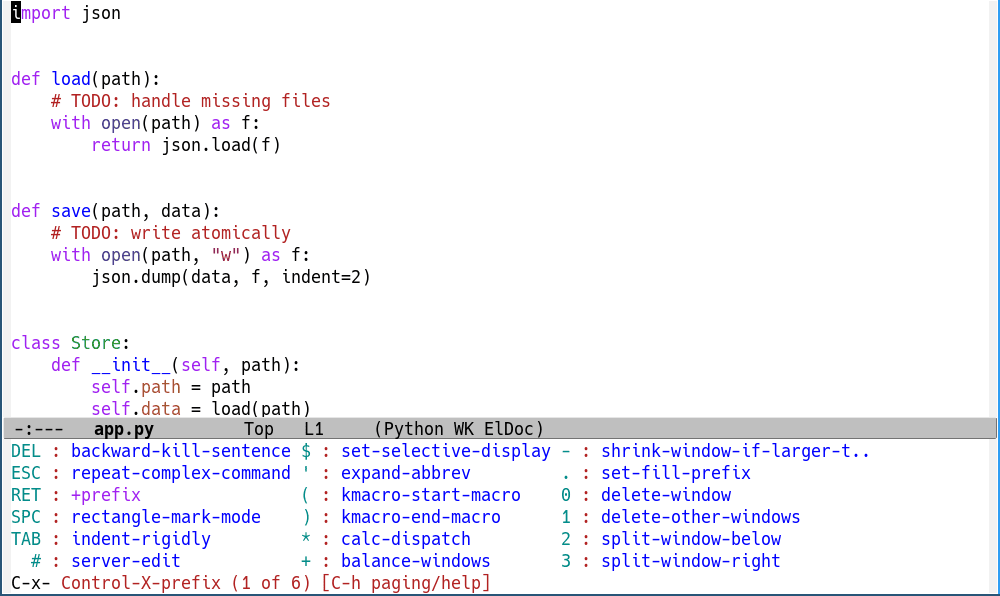
The keys after C-x do not fit on one screen, so the table has 6 pages.
Press C-h to see how to turn the pages.
When you forget the key for a command, press the prefix, wait, and find the command by name.
See a faint completion as you type
With completion-preview-mode on, a completion for the symbol you are typing appears in faint text after the cursor.
TAB accepts it, and M-i completes up to the longest common prefix of the candidates.
(global-completion-preview-mode 1)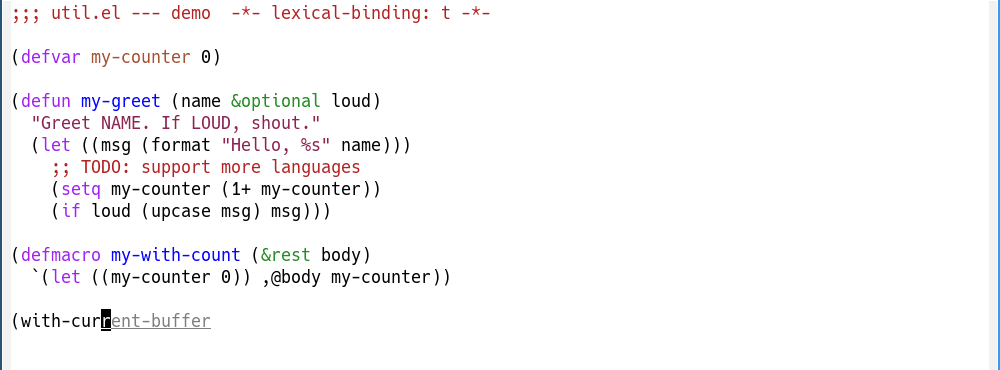
The preview appears once you have typed three characters of a symbol.
In the screenshot I typed (with-cur in an Emacs Lisp buffer, and the rest, rent-buffer, shows in faint text.
Indent wrapped lines as if M-q had filled them
visual-wrap-prefix-mode, the adaptive-wrap package from GNU ELPA brought into Emacs, indents each continuation line to match the line it continues.
Unlike M-q, it changes only the display and leaves the buffer text alone.
(add-hook 'text-mode-hook #'visual-line-mode)
(add-hook 'text-mode-hook #'visual-wrap-prefix-mode)
The left buffer has visual-wrap-prefix-mode on, and the right buffer holds the same text with the mode off.
On the left, wrapped bullet items line up after the bullet, and the wrapped comment lines up after the comment starter.
Eight Modus themes
Emacs 28 shipped the light modus-operandi and the dark modus-vivendi, and Emacs 30 adds six more.
Each comes in a light and a dark version: -tinted for easier reading, -deuteranopia for red-green color deficiency, and -tritanopia for blue-yellow color deficiency.
(load-theme 'modus-vivendi-tinted t)
The left shot is modus-vivendi-tinted and the right shot is modus-operandi-deuteranopia.
You switch between all eight with load-theme.
Show Flymake diagnostics at the end of the line
Set flymake-show-diagnostics-at-end-of-line to t, and Flymake puts each diagnostic in a box at the end of its line.
You read the message where it is, without hovering the mouse or opening another buffer.
(setopt flymake-show-diagnostics-at-end-of-line t)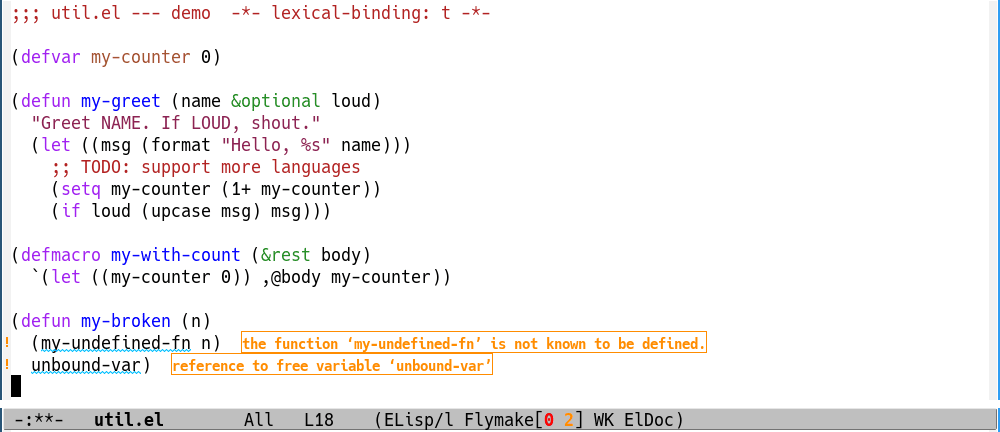
I wrote my-broken, which uses an undefined function and an undefined variable, in an Emacs Lisp file and turned on flymake-mode.
The byte-compiler warnings appear at the end of two lines, and the mode line shows a warning count of 2.
In Emacs 30, the Emacs Lisp backend runs only in files covered by trusted-content.
To try it, list the directories you trust, for example with (setopt trusted-content '("~/project/")).
Show the current function in the header line
Set which-func-display to header, and which-function-mode shows the name of the function at point in the header line at the top of the window.
The default, mode, shows it in the mode line, and mode-and-header shows it in both.
(setopt which-func-display 'header)
(which-function-mode 1)
Point is inside the method put of the Python class Store, and the header line reads Store.put even though the class Store: line has scrolled off the screen.
When you scroll through a long method, the header line still tells you which function you are in.
Group grep results by file
Set grep-use-headings to t, and M-x grep groups its results by file, with the matching lines under a heading for each file name.
It looks like --heading in git grep and rg.
(setopt grep-use-headings t)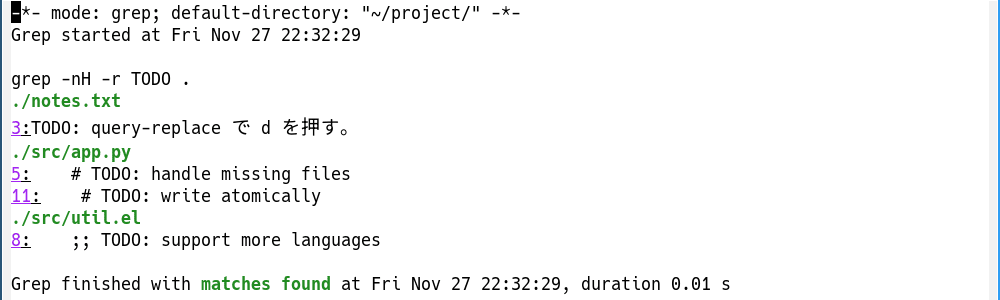
Line numbers and matching lines sit under the green file names, so a file with many matches no longer repeats its name on every line.
Other changes worth a look
- Native compilation is on by default in
configurewhen libgccjit is available. - replace-regexp-as-diff shows a regexp replacement as a diff, which you can then apply as a patch.
- With kill-ring-deindent-mode on, copying indented code removes the leading indentation before the text goes into the kill ring.
- Mode line items placed after mode-line-format-right-align are aligned to the right.
New features from Emacs 27 to the development version
I wrote one post in the same format for each Emacs release from 27 to the development version.