 Conao3 Notes
Seven fun new features in Emacs 31, shown in screenshots
I picked seven new features from the Emacs 31.1 NEWS that you notice the moment you use them, and this post shows each one in a screenshot. They cut small chores out of daily editing: completion candidates narrow as you type, and you can edit grep results and send the edits back to the files.
The NEWS lives in etc/NEWS and runs to 4,274 lines. Instead of listing everything, I chose the features I wanted to try at once and ran them one by one.
I took every screenshot in Emacs 31.1 started with emacs -Q, and I include the code for each feature that needs a setting.
Completion candidates narrow as you type
Set completion-eager-display to t, and the *Completions* buffer appears as soon as a minibuffer with completion opens.
Set completion-eager-update to t, and the candidate list updates with every character you type.
(setopt completion-eager-display t
        completion-eager-update t)
Both default to auto, which shows or updates the list only when the completion table asks for it.
With both set to t, the candidates stay in view without TAB, and emacs -Q becomes pleasant to use without Vertico or Icomplete.
The screenshot shows M-x after typing window-layout-.
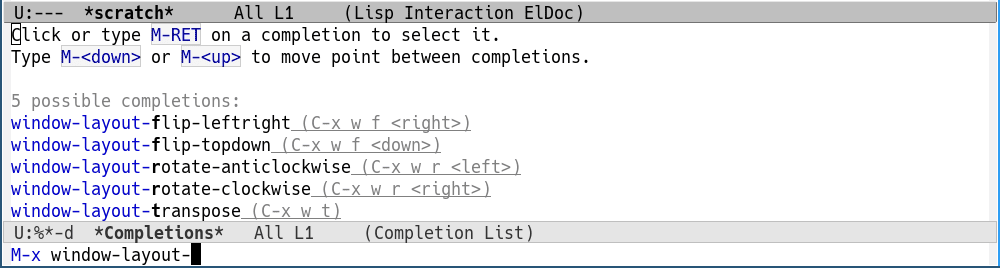
The list has narrowed to five commands, each with its key binding. The next section tries these commands.
Rotate, flip, and transpose the window layout
Emacs 31.1 adds commands that rearrange the whole window layout of a frame.
They all live under C-x w.
| Key | Command | Effect |
|---|---|---|
C-x w r <right> |
window-layout-rotate-clockwise |
Rotate the layout clockwise |
C-x w r <left> |
window-layout-rotate-anticlockwise |
Rotate the layout anticlockwise |
C-x w f <down> |
window-layout-flip-topdown |
Flip the layout top to bottom |
C-x w f <right> |
window-layout-flip-leftright |
Flip the layout left to right |
C-x w t |
window-layout-transpose |
Turn horizontal splits into vertical splits and back |
C-x w o <right> |
rotate-windows |
Keep the layout and move each buffer to the next window |
I split the frame into one window on the left and two stacked windows on the right, then pressed C-x w r <right>.
The left window moved to the top, and the two on the right moved to the bottom.
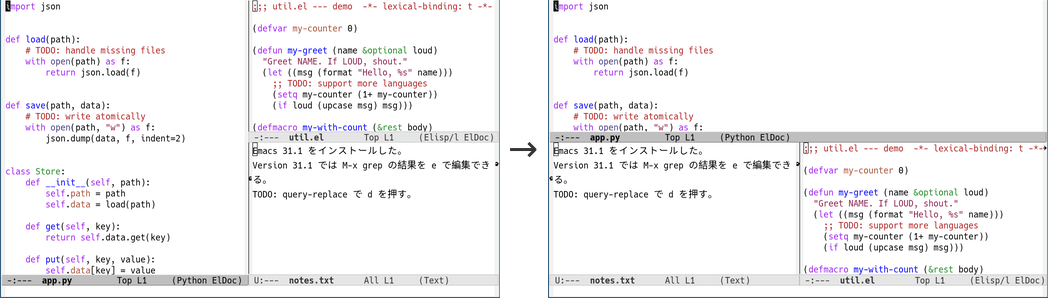
When you move between a tall screen and a wide one, or want a side-by-side diff stacked instead, you no longer have to rebuild the windows by hand.
Edit grep results and write the edits back to the files
Press e in the M-x grep results buffer, and the buffer switches to Grep Edit mode, where you can edit the result lines.
An edit to a line goes into the buffer visiting that file.
Press C-c C-c to leave the mode.
In the screenshot, I searched for TODO, then used M-% on the four result lines to replace TODO with DONE.
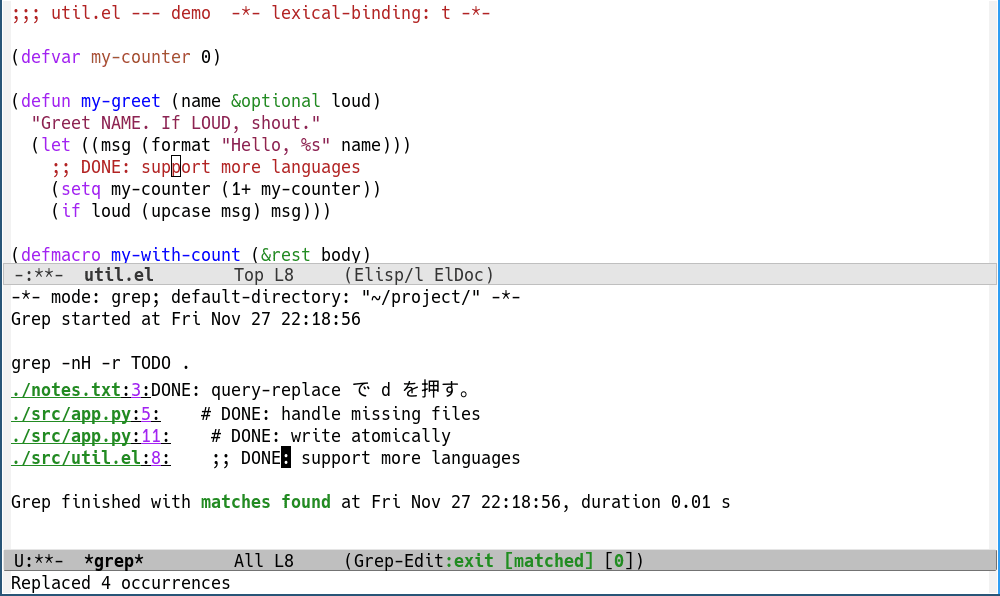
The util.el buffer at the top now has DONE too, and its mode line shows ** for unsaved changes.
The edits stay in the buffers, so you save the files as usual with C-x s.
It works like e in Occur mode, so you can fix many matches right from the grep results.
See the diff of a replacement before you make it
Press d in the middle of a M-% replacement, and the diff with all replacements applied appears in the *replace-diff* buffer.
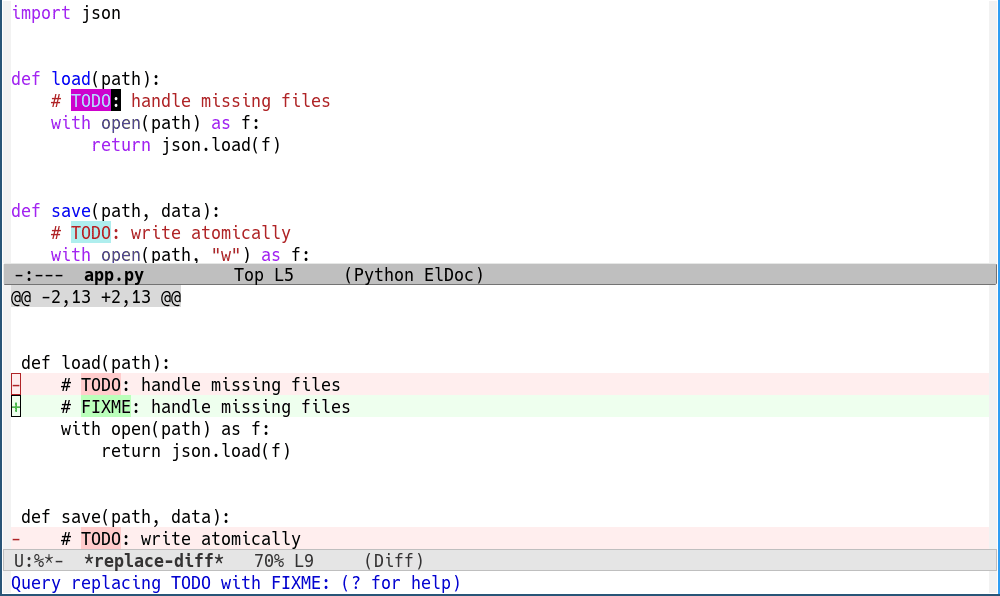
Here I was replacing TODO with FIXME in app.py and pressed d partway through.
The replacement prompt is still active after the diff appears, so you can carry on with y or !.
The help from ? says " d to display the diff buffer with all replacements".
When a replacement touches many places, you can check all of them before pressing y one match at a time.
Show fold indicators and hidden line counts
When you fold functions and classes with hs-minor-mode, setting hs-show-indicators to t puts open and close indicators at the left edge.
Setting hs-display-lines-hidden to t shows the number of hidden lines next to the ellipsis.
(setopt hs-show-indicators t
        hs-display-lines-hidden t)
(add-hook 'prog-mode-hook #'hs-minor-mode)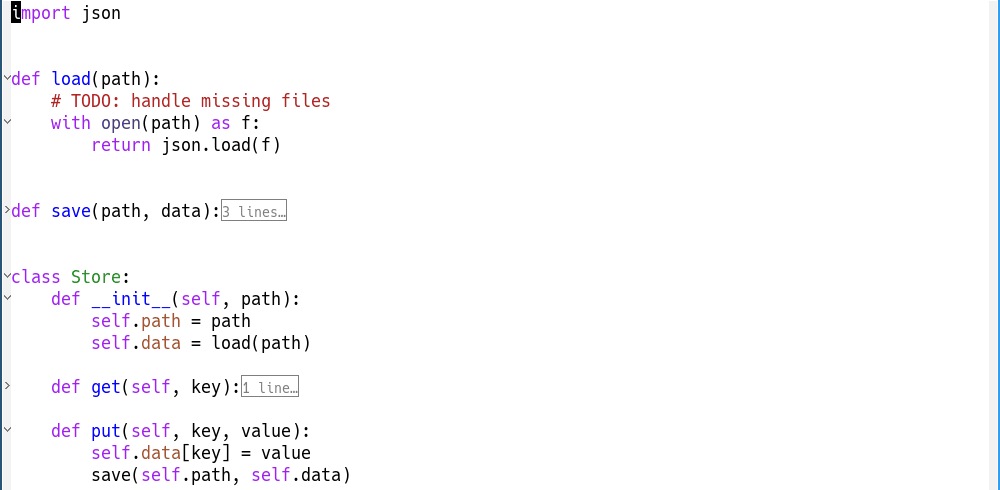
The folded save and get have right-pointing indicators with "3 lines" and "1 line", and the open blocks have downward-pointing ones.
A click on an indicator also opens or closes the block.
hs-cycle cycles through three states: the parent block folded, only the nested blocks folded, and everything open.
Convert between full-width and half-width characters
halfwidth-region turns the full-width letters, digits and symbols in the region into ASCII, and fullwidth-region does the reverse.
halfwidth-word and fullwidth-word convert the word after point, and a numeric argument such as C-u 3 converts that many words.
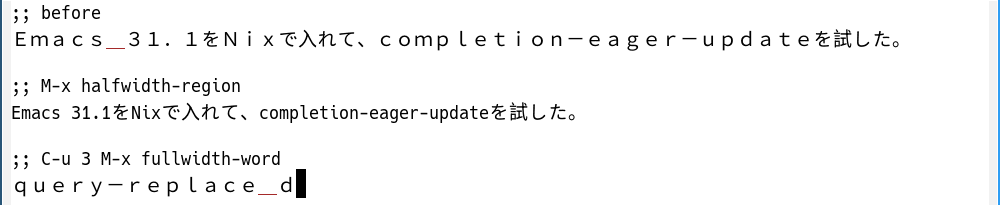
Running halfwidth-region on the full-width sentence in the first example gives the second one, with the letters, digits and the full-width space turned into ASCII.
The third example is query-replace d after C-u 3 M-x fullwidth-word, and the - and the space became full-width as well.
CJK text often mixes in full-width letters and digits, and these commands normalize them without a regular expression.
Child frames in terminal Emacs
A child frame is a small frame drawn inside its parent frame.
In the GUI, Corfu and Posframe use child frames for completion candidates and pop-ups, and Emacs 31.1 can create child frames in a terminal under emacs -nw too.
(featurep 'tty-child-frames) tells you whether the terminal supports them.
According to the NEWS, recent versions of Posframe and Corfu use child frames on a terminal when they are available.
To show tooltips as child frames on a terminal, turn on tty-tip-mode.
The screenshot shows emacs -nw running in foot after I evaluated this code.
(let ((frame (make-frame `((parent-frame . ,(selected-frame))
                           (left . 22) (top . 6)
                           (width . 40) (height . 3)
                           (minibuffer . nil)))))
  (with-current-buffer (get-buffer-create "*doc*")
    (insert "json.load(fp, *, cls=None, ...)\n"
            "Deserialize fp (a .read()-supporting\n"
            "file) to a Python object.")
    (setq mode-line-format nil)
    (goto-char (point-min)))
  (set-window-buffer (frame-root-window frame) "*doc*"))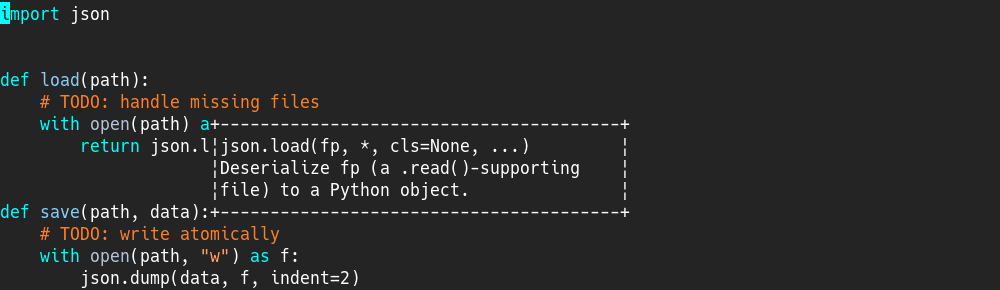
The child frame sits on top of the code with a line border, and it hides only the code under it.
With Emacs 31.1 and a recent Corfu on the remote host, completion candidates pop up even in emacs -nw over SSH.
Other changes worth a look
- xterm-mouse-mode is on by default in compatible terminals, so the mouse works in
emacs -nw. - With kill-region-dwim set,
C-wkills the previous word when no region is active. - C-h u runs
apropos-user-optionto search user options. - treesit-auto-install-grammar controls whether a tree-sitter mode installs a missing grammar library when it starts.
- newcomers-presets is a theme that collects settings for new users that are too invasive to turn on by default.
New features from Emacs 27 to the development version
I wrote one post in the same format for each Emacs release from 27 to the development version.